





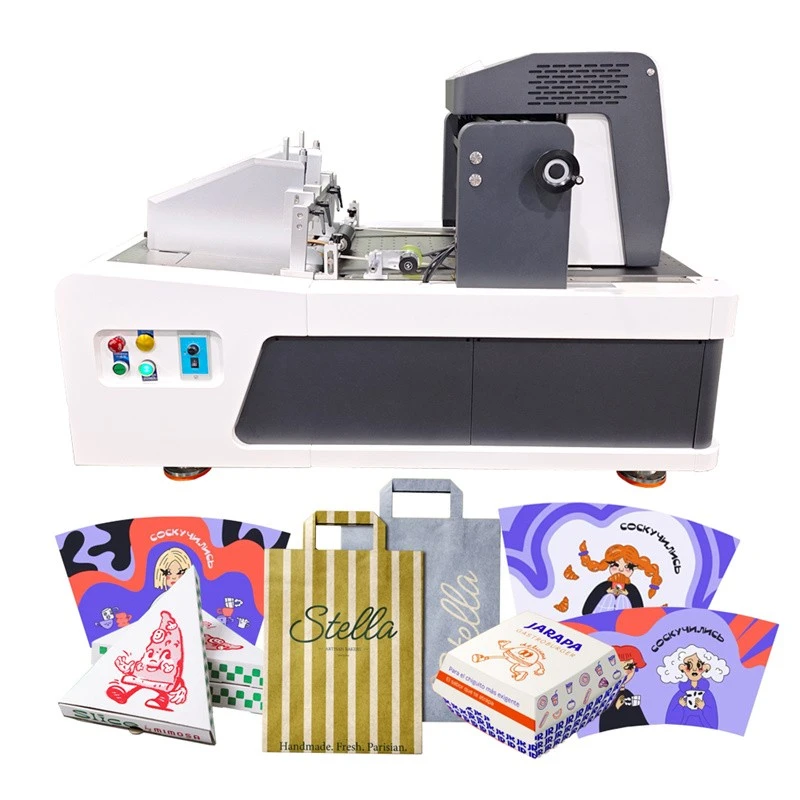

Takeaway Box Printing Machine
The Takeaway Box Printing Machine is a digital single-pass inkjet printer designed to print graphics, text, and branding onto compatible takeaway food packaging materials.

- Product Introduction
The Takeaway Box Printing Machine is a digital single-pass inkjet printer designed to print graphics, text, and branding onto compatible takeaway food packaging materials.
Product Specifications
|
Parameter |
Specification |
|
Printing Technology |
Thermal Foaming Inkjet |
|
Printhead Options |
A3 Printhead / 841 Industrial Printhead |
|
Ink Type |
Thermal Foaming CMYK Water-Based Ink |
|
Printing Resolution |
600 × 1200 DPI |
|
Printing Speed |
10–40 m/min |
|
Listed Working Widths |
12.9 cm / 25.8 cm |
|
Supported File Formats |
BMP, JPG, PDF, TIFF |
|
Data Transmission |
USB 3.0 |
|
Ink Supply |
Continuous Ink Supply |
|
Ink Level Detection |
Ultrasonic Liquid-Level Detection |
|
Conveyor Platform |
Vacuum Negative-Pressure Platform |
|
Sensing Method |
Infrared Photoelectric Sensor |
|
Machine Structure |
Aluminum Alloy and Steel |
|
Control Software |
Kelier 3.0 |
|
RIP Software |
Flexi21 |
|
Operating System |
Windows 10 / Windows 11 |
|
Operating Temperature |
15–35°C |
|
Relative Humidity |
20%–80% |
|
Printhead-to-Surface Gap |
0.5–3 mm |
|
Maximum Printhead Lift |
Up to 13.5 cm, as stated by the manufacturer |

Takeaway Box Compatibility
Paperboard and Kraft Paper: Surface coating, absorbency, and flatness affect ink appearance and feeding stability.
Formed Boxes: Lids, raised edges, and openings may restrict access to the print area. Confirm compatibility using box samples or drawings.
Folds and Adhesive Joints: Position graphics to keep essential text and logos clear of creases and glued areas.
Feeding Clearance: Check box dimensions against the machine's printhead adjustment and conveyor arrangement.
Short-Run Production Planning
Artwork Changes: Digital printing eliminates the need for a new conventional printing plate for each design.
Variable Orders: Multiple designs can be handled through digital artwork changes, although loading and alignment affect changeover time.
Production Estimates: The listed speed is 10–40 m/min, not a guaranteed finished-box output. Account for handling, changeovers, and rejected pieces when estimating capacity.
Artwork and Print Quality Control
Artwork Layout: Keep logos, text, and barcodes within the effective print area and away from folds or glued seams.
Color Performance: Test the intended paperboard or kraft paper to assess color appearance, legibility, and drying behavior.
Print Consistency: Warped sheets and uneven surfaces can affect positioning and printhead clearance. Establish acceptance criteria for print position, clarity, and color before production.
OEM & ODM Customization
Kelier provides OEM/ODM services for printing equipment. Available options depend on the selected model and application.
|
Customization Item |
Details |
|
Printhead Configuration |
Confirm the available A3 or 841 industrial printhead option. |
|
Working Width |
Select the suitable configuration for the required print area. |
|
Ink Compatibility |
Evaluate water-based CMYK ink on the intended substrate. |
|
Feeding Arrangement |
Check compatibility with flat sheets or the specified box format. |
|
Software Requirements |
Confirm operating system and RIP workflow compatibility. |
|
Artwork Preparation |
Agree on file formats and layout requirements. |
|
Sample Testing |
Where available, define test materials and print acceptance criteria. |
Quality Assurance
Print Inspection
Check logo definition, text clarity, color appearance, and positioning against agreed criteria.
Substrate Testing
Assess ink adhesion and drying behavior on the intended packaging material.
Configuration Check
Match the printhead, working width, ink system, and software to the purchase specifications.
Logistics & Technical Support
Pre-Shipment Check: Verify the machine configuration, accessories, and supplied documentation.
Setup Guidance: Confirm available assistance for installation, cleaning, artwork preparation, and troubleshooting.
Spare Parts: Check the availability of compatible ink and replacement parts.
Export Arrangements: Confirm power requirements, shipping terms, protective packaging, and import documentation.


Frequently Asked Questions
Q: What materials can the machine print on?
A: It is designed for compatible paper-based materials, including suitable kraft paper and paperboard. Test the intended substrate to check print quality and ink behavior.
Q: Can it print directly on assembled takeaway boxes?
A: This depends on the box shape and feeding arrangement. Check dimensions, lids, openings, and accessible print surfaces before ordering.
What is the printing speed?
The listed speed is 10–40 m/min. Actual output depends on material handling, setup, changeovers, and rejected pieces.
Q: What printing resolution does it support?
A: The listed resolution is 600 × 1200 DPI. Results also depend on the substrate, artwork, and printhead setup.
Q: Does digital printing require printing plates?
A: No conventional printing plate is needed for each artwork change, although setup and test printing may still be required.
Q: Which file formats are supported?
A: The listed formats are BMP, JPG, PDF, and TIFF. Confirm file preparation requirements with the supplier.
Q: What is the difference between printhead lift and printhead-to-surface gap?
A: Printhead lift refers to the head's mechanical lifting range; the working gap is the distance between the printhead and the surface during printing. The manufacturer lists up to 13.5 cm lift and a 0.5–3 mm working gap. Neither figure alone determines the maximum compatible box height.
Q: Is water-based ink suitable for food packaging?
A: Water-based ink does not automatically establish direct food-contact compliance. Check the relevant documentation and regulations for the intended use and destination market.
Q: How can print quality be evaluated before purchase?
A: Where sample testing is available, assess color, legibility, positioning, adhesion, and drying on the intended packaging material.
Q: What information is needed for a quotation?
A: Provide box dimensions, material, packaging format, print area, artwork, expected order volume, destination country, and power supply requirements.
Hot Tags: takeaway box printing machine, China takeaway box printing machine manufacturers, suppliers, factory, Desktop Direct Printing Machine, Desktop Inkjet Printer Machine, Desktop Single Pass Printer, Desktop Single Pass Printer for Paper Bags, Printer for Cardboard Boxes, Small Digital Printing Machine


