




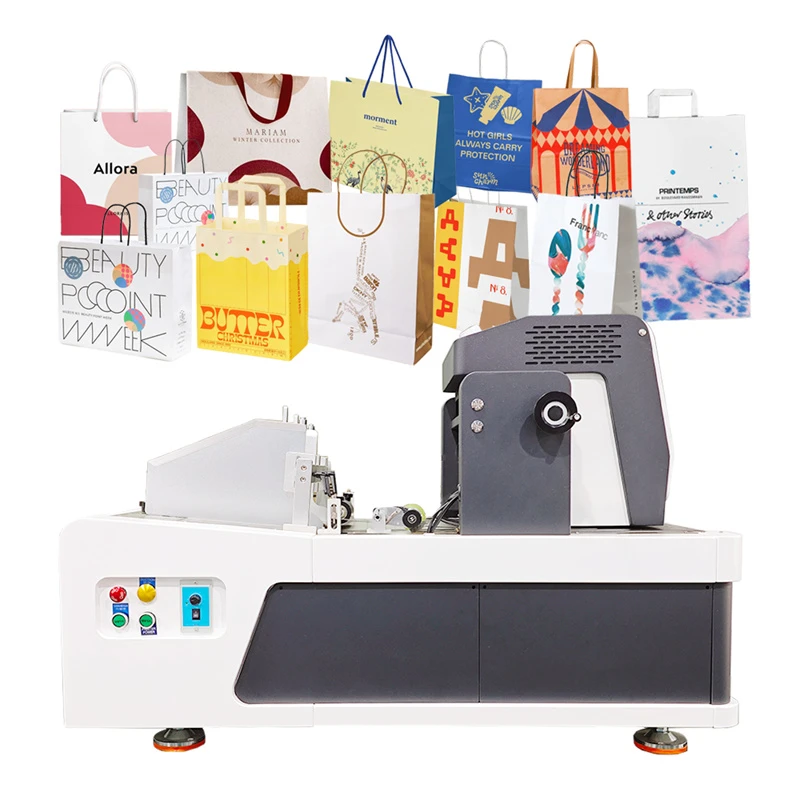


Small Digital Printing Machine
The Small Digital Printing Machine is a desktop single-pass inkjet printer designed for digital printing on paper-based packaging and compatible flat materials.

- Product Introduction
The Small Digital Printing Machine is a desktop single-pass inkjet printer designed for digital printing on paper-based packaging and compatible flat materials. Using thermal foam printhead technology and CMYK water-based ink, it prints logos, text, graphics, and packaging artwork directly onto substrates.
Product Specifications
|
Parameter |
Specification |
|
Product Name |
Small Digital Printing Machine |
|
Print Head |
A3 Printhead / 841 Industrial Printhead |
|
Print Technology |
Thermal foam technology |
|
Ink Type |
Thermal foaming CMYK water-based ink |
|
Resolution |
600 × 1200 DPI |
|
Printing Speed |
10–40 m/min |
|
PC System |
Windows 10 / Windows 11 |
|
Language |
English; customization available |
|
Image Format |
BMP / JPG / PDF / TIFF |
|
Data Transmission |
USB 3.0 |
|
Ink Detection |
Ultrasonic liquid level detection |
|
Ink Supply Method |
Continuous ink supply |
|
Software |
Kelier 3.0 |
|
Conveyor Platform |
Vacuum negative pressure |
|
Machine Structure |
Aluminum alloy + steel structure |
|
RIP |
Flexi21 |
|
Sensing Method |
Infrared photoelectric sensor |
|
Operating Temperature |
15–35°C |
|
Operating Humidity |
20%–80% |
|
Printhead-to-Substrate Distance |
0.5–3 mm |

Flexible Production for Short-Run Packaging
Small-Batch Orders: Digital printing is suitable for packaging jobs with limited quantities, including promotional boxes, seasonal packaging, and customized orders that do not require conventional printing plates.
Frequent Artwork Changes: Logos, graphics, and product information can be updated through digital files. Packaging suppliers can switch between designs without repeating the traditional plate-making process for each artwork.
Mixed Packaging Jobs: Compatible paper bags, cardboard boxes, pizza boxes, and other flat packaging products can be processed as separate jobs according to their artwork and material requirements.
Material Handling and Print Positioning
Vacuum Negative Pressure Platform: The vacuum platform helps hold compatible flat materials in position during printing. Stable substrate placement is important for maintaining consistent print positioning.
Infrared Photoelectric Sensor: The printer incorporates infrared photoelectric sensing as part of its printing configuration
Printhead Clearance: The specified printhead-to-substrate distance is 0.5–3 mm. Buyers should consider substrate flatness and surface variation when evaluating material compatibility.
Digital Printing Setup and Ink Management
File Compatibility: The printer supports BMP, JPG, PDF, and TIFF files, processed through the Kelier 3.0 software and Flexi21 RIP workflow.
Continuous Ink Supply: The continuous ink supply system supports ongoing printing operations, while ultrasonic liquid level detection provides ink-level monitoring.
Operating Conditions: The specified operating temperature is 15–35°C, with relative humidity between 20% and 80%.
OEM & ODM
|
Customization Item |
Available Options |
|
Printhead Configuration |
A3 Printhead / 841 Industrial Printhead |
|
Operating Language |
English; customized language options |
|
Application Requirements |
Configuration evaluation based on packaging material and printing needs |
Applications
Corrugated Boxes and Cardboard Packaging: Suitable for printing logos, product graphics, and packaging information on compatible corrugated and cardboard surfaces.
Paper Bags and Kraft Packaging: Supports branding and graphic printing on compatible paper bags and kraft paper packaging for retail and promotional applications.
Pizza Boxes and Paper Cup Fans: Can be used for compatible flat paper packaging requiring customized graphics or branding. Material suitability should be evaluated before production.
Our Service
Application Evaluation: Buyers can provide packaging materials, artwork, and printing requirements for application assessment before selecting the equipment configuration.
Technical Consultation: Kelier can discuss printhead options, operating language, software requirements, and substrate compatibility with buyers before ordering.
Sample Printing: Representative packaging materials and artwork can be used to evaluate print clarity, positioning, and substrate compatibility before production use.


FAQ
Q: What materials can the Small Digital Printing Machine print on?
A: The machine is designed for compatible paper-based materials, including corrugated cardboard, cardboard boxes, paper bags, kraft paper, pizza boxes, and paper cup fans. Material compatibility should be evaluated before production.
Q: What is the printing speed?
A: The published printing speed is 10–40 m/min. Actual performance depends on the printing configuration, artwork, substrate, and operating conditions.
Q: What printing resolution does the machine support?
A: The specified resolution is 600 × 1200 DPI. Sample printing can help buyers assess whether the output meets their requirements for graphics, logos, and text.
Q: What is the required distance between the printhead and substrate?
A: The specified printhead-to-substrate distance is 0.5–3 mm. Material flatness and positioning should be considered when preparing packaging samples.
Q: Does the printer support different packaging designs?
A: Yes. Digital artwork can be changed between printing jobs, allowing businesses to print different logos, graphics, and packaging information without conventional plate-making for each design.
Q: What file formats does the printer support?
A: The printer supports BMP, JPG, PDF, and TIFF files. Printing jobs are processed through the Kelier 3.0 software and Flexi21 RIP workflow.
Q: What computer system is required?
A: The printer supports Windows 10 and Windows 11 and uses USB 3.0 data transmission.
Q: Is the printer suitable for food packaging?
A: The machine can be used for compatible paper-based food packaging applications, such as pizza boxes. Buyers must verify ink suitability, packaging construction, and applicable food-contact or migration requirements for their intended market. Printing on packaging does not automatically establish food-contact compliance.
Q: What information should buyers provide when requesting a quotation?
A: Buyers should provide the packaging material, product dimensions, artwork, expected order volume, printing requirements, and destination country. Representative samples can help evaluate material compatibility and printing results.
Q: Can printing samples be evaluated before purchase?
A: Sample printing can help buyers assess image clarity, positioning, and material compatibility. Providing representative packaging materials and artwork allows printing requirements to be evaluated before production.
Hot Tags: small digital printing machine, China small digital printing machine manufacturers, suppliers, factory, Desktop Inkjet Printer Machine, Desktop Single Pass Printer, Desktop Single Pass Printer for Paper Bags, mini desktop single pass printer, Paper Bag Printer Machine, Printer for Cardboard Boxes


